
Core Concepts
Understand the core entities, lifecycle, and building blocks inside Novu's Agent Communication Infrastructure implementation.
Novu for Agents is built around a set of concepts, these concepts are how Novu implements Agent Communication Infrastructure (ACI).
The mental model
Novu for Agents connects messaging platform to your agent logic through a standard communication layer. This communication can be bi-directional, a user can message your agent, and your agent can proactively reach out to a user.
When a user sends a message or interacts with your agent from a connected platform, the inbound flow works like this. Novu receives it, resolves identity and conversation state, and forwards the full context to your server. Your agent processes the message and replies, then Novu delivers the response back to the platform. The flow works like this:
Here's what happens at each step:
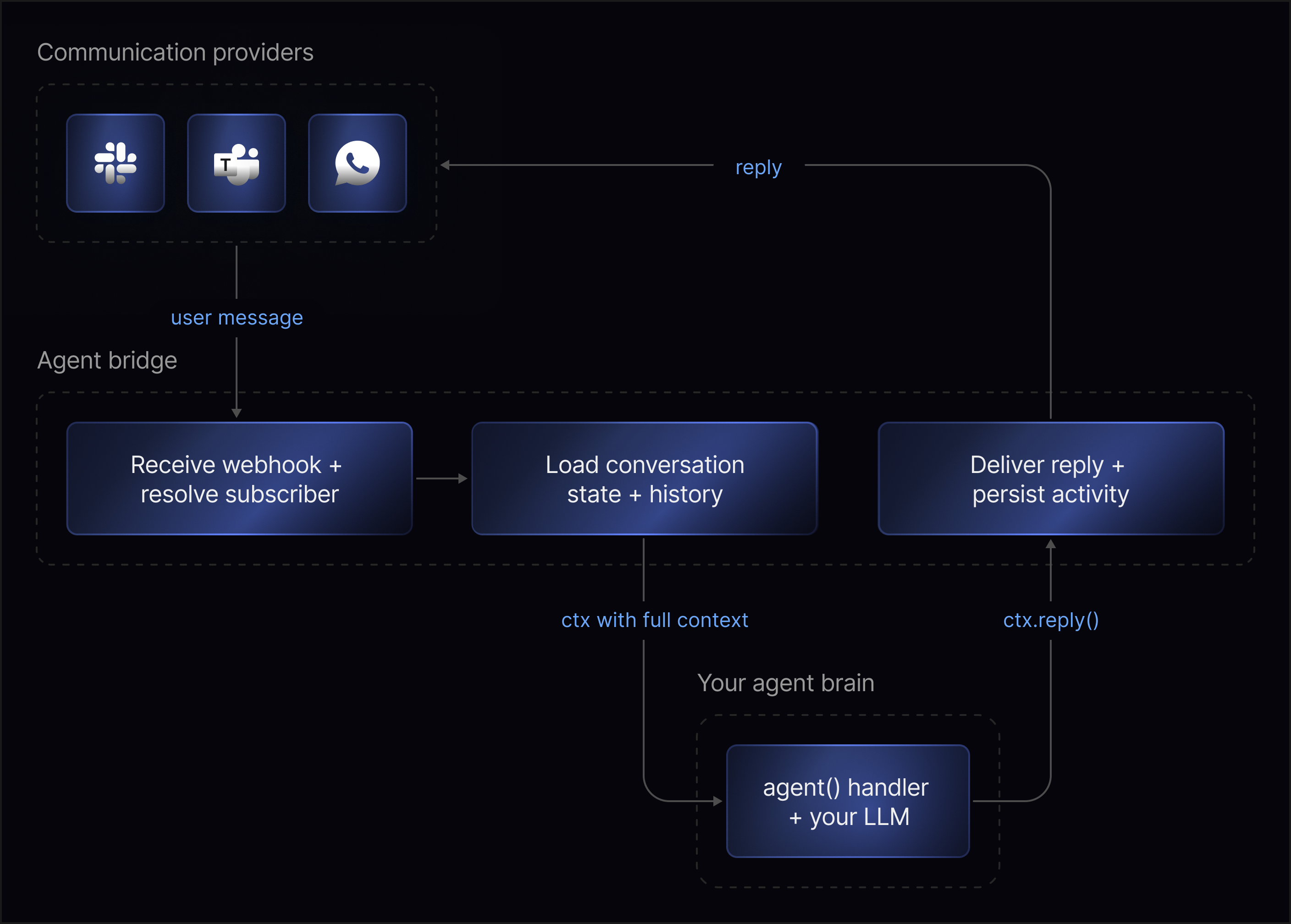
Receive and identify
Novu receives the platform webhook and normalizes it into a standard format. It matches the platform user, for example, a Slack user ID to a Novu subscriber. Known users get their full profile attached, while Novu tracks unknown users as anonymous until their identity is resolved.
Load conversation
Novu creates a new conversation, if this is the first message or loads the existing one. The message history, metadata, and subscriber information are assembled into a single context object.
Your handler
Novu calls your handler with the complete context: the message, conversation history, subscriber, and platform details. You process it with your LLM, business logic, or whatever system you've chosen, and call ctx.reply() to respond.
Deliver and persist
Novu delivers the reply to the correct thread on the platform, persists it in the conversation history, and records the activity. Every message, signal, and status change is visible in the dashboard.
Your server never talks to the platform directly. It receives a context object and returns a reply, Novu handles everything else.
Key entities
Four core entities make up the system.
Agents
An agent is the entity you create in Novu when you want to expose agent logic through one or more communication providers.
Each agent has a name, an identifier, and a set of event handlers that define how your application responds to conversation events. An agent can be connected to one or more providers, such as Slack, Microsoft Teams, WhatsApp, or email.
The agent doesn't define your AI model, prompts, tools, or business logic. It gives Novu a bridge to the application code where that logic runs. The provider handles where the user communicates. The agent handles how your application responds.
Providers connection
A provider connection connects an agent to a messaging platform. Providers are the surfaces where users interact with your agent. A provider connection gives Novu the credentials and configuration needed to receive events from that provider and deliver responses back to it.
Each provider has its own setup flow and platform capabilities. Some providers support reactions, typing indicators, attachments, rich cards, or message editing. Others may support only a subset of those behaviors. Novu normalizes provider events before passing them to your agent handler, so your code works with a consistent interface instead of provider-specific webhook payloads.
This is what makes the architecture channel agnostic, you won't see anything related to Slack or WhatsApp or email in your agent code. Novu takes care of translating messages downstream to each provider's specific format and capabilities.
Conversations
A conversation is the stateful thread where communication happens. When a user sends a message from a connected provider, Novu creates a new conversation or loads the existing one for that thread. The conversation includes the message history, metadata, participants, status, and platform context needed to process the next interaction.
A conversation can include multiple participants. The agent is one participant in the conversation, but it is not the conversation itself. This distinction matters when you inspect conversations in the dashboard or build agent behavior around conversation state. A Slack thread, email thread, or other provider-specific thread maps to a conversation in Novu automatically.
The conversations follow a simple lifecycle, a conversation starts as active when the first message arrives. Messages, actions, and reactions continue updating the conversation while it remains active. The conversation can be marked as resolved when the agent calls the resolve signal. When a conversation is resolved, the resolve handler fires and an optional summary is stored.
If a user sends a new message after a conversation has been resolved, the conversation automatically reopens so the interaction can continue.
Participants and subscriber identity
Participants are the people, agents, or systems involved in a conversation. When a user messages your agent from a provider, Novu tries to resolve that platform user to a known subscriber.
- If a match exists, then the handler receives subscriber information such as the subscriber ID, name, or email.
- If no match exists, then the user is tracked as a platform user and your handler should account for cases where subscriber data is unavailable.
Once identity is resolved later, they are upgraded to a full subscriber and future messages include their subscriber data.
Subscriber identity helps your agent personalize responses, look up account details, or decide whether a conversation should be escalated. Identity resolution is provider-aware, a Slack user, or email sender may each have different identifiers at the provider level that Novu resolves to a single subscriber.
The bridge surface
Novu exposes a consistent set of building blocks to your agent code. These are the same regardless of which provider the message came from or what brain you've plugged in.
Event handlers
Event handlers are functions that respond to events in a conversation. Your agent can respond to four event types:
| Handler | When it runs | Common use case |
|---|---|---|
onMessage | A user sends a message in the conversation | Process the message and reply |
onAction | A user clicks a button or selects a value in an interactive card | Handle form submissions, button clicks, or dropdown selections |
onReaction | A user adds or removes a reaction | Capture feedback or trigger a follow-up |
onResolve | The conversation is marked as resolved | Clean up state, log analytics, or send a summary |
Handlers are where the communication layer connects to your application logic. For example, an onMessage handler receives the user's message, passes the conversation context to an LLM or custom function, and sends the response back through Novu.
Context object
Each event handler receives a context object. The context object gives your handler the information it needs to understand the current event and respond to it. Depending on the event type, it can include:
- The incoming message.
- The current conversation state and metadata.
- The resolved subscriber (when available).
- Recent conversation history.
- Provider information.
- Platform-specific details, such as thread or channel identifiers.
- Methods for replying, updating metadata, triggering workflows, or resolving the conversation.
The context object is the single interface between Novu's communication layer and your agent logic. Your code doesn't need to talk directly to Slack, Microsoft Teams, WhatsApp, or email, everything flows through the context.
Replies and interactions
A reply sends a message back into the conversation. Agents can reply with different content types depending on the provider and platform capabilities: plain text, markdown with files, or interactive cards.
Interactive cards let your agent send structured responses with components such as buttons, dropdowns, links, and text inputs. When a user interacts with a card, the onAction handler fires with the action ID and selected value.
Replies are user-facing, use them when the agent needs to communicate something back to the participant in the conversation.
Signals
Signals are system-facing actions your agent can perform during a conversation. Use signals when your handler needs to update state, trigger another process, or close a conversation, without necessarily sending another message to the user.
| Signal | What it does |
|---|---|
| Metadata | Stores key-value data on the conversation that persists across messages |
| Trigger | Starts a Novu workflow from within the conversation |
| Resolve | Marks the conversation as resolved with an optional summary |
A useful way to think about the difference: replies communicate with the user, signals update the system around the conversation. A single handler invocation can do both, reply to the user, store a sentiment score in metadata, trigger an escalation workflow, and resolve the conversation.
Signals aren't sent immediately when you call them. They're queued in memory and batched together with your next reply call in a single request. If your handler finishes without calling reply handler, any pending signals are still sent automatically.
Conversations and workflows
ACI's conversation model and Novu's workflows are designed to work together. A conversation can trigger a workflow.
For example, a user chatting with an agent in Slack asks it to prepare a report and send it via email. The agent calls a trigger function to fire a Novu workflow that handles the email delivery using the same workflow infrastructure your team might already have in place.
A workflow can convert into a conversation. For example, you send a weekly digest notification to a user's email. The user replies to that email with a follow-up question, and that reply enters ACI as a new conversation with the agent. What started as a one-directional notification becomes a back-and-forth exchange.
This connection means ACI is not a replacement for Novu's workflow system — it's an extension of it. The structured, predictable nature of transactional workflows and the open-ended, freeform nature of agent conversations are complementary. The value is in the combination of the two within the same platform.
How the Concepts Work Together
Here is the end-to-end flow when a user messages your agent:
- A user sends a message to your agent from Slack.
- Novu receives the Slack event through the provider connection.
- Novu maps the Slack thread to a conversation and resolves the platform user to a subscriber when possible.
- Novu calls the agent's
onMessagehandler with the context object. - Your handler passes the message and conversation context to your agent logic.
- Your agent logic decides what should happen next.
- Your handler sends a reply, emits signals, or both.
- Novu delivers the reply back to the Slack thread.
- Novu records the messages, participants, metadata, signals, and conversation status.
The same agent logic works across all connected providers because Novu handles the provider-specific communication layer. Connecting a new provider does not require changing your agent code.
Next steps
Now that you understand the core concepts, continue with: